

XAMPP 8.5.12
XAMPP is a free, open-source local web server stack by Apache Friends that bundles Apache, MariaDB, PHP, and Perl into one installer for Windows, macOS, and Linux. The current Windows version is 8.5.12 (PHP 8.2.12), with PHP 8.3 only available on non-Windows platforms or through the experimental "XAMPP for Browsers" sandbox. It includes phpMyAdmin, Bitnami one-click installers for WordPress and other CMS platforms, and a port checker tool. However, it's not designed for production: default configurations leave MariaDB root passwordless and phpMyAdmin open, and recent vulnerabilities (CVE-2024-4577, a 2026 privilege escalation flaw) make secure configuration essential. For Windows developers, Laragon offers per-project PHP versions, automatic virtual hosts, and a more modern workflow, making XAMPP increasingly a beginner's tool rather than a professional default.
- Free
- Windows
- macOS
- Linux
- Nov 9, 2026
4a9a05567a469eceb02744345c29f1b1aaf3c3762fb7d452861e040a1d627c6fVirusTotal report ↗90dc4546df0dc0cad38daaf62ef2c21b4ae47e6f7a2b2dd7b1c64b41edfb669cVirusTotal report ↗8cfb852bde04c95d449b52eb8966c8563e33ee93f25a10ca53099cddee4e12baVirusTotal report ↗Screenshots
About XAMPP
XAMPP Download, Local Web Server Stack for PHP Development
TL;DR Quick Take / Who is this for?
XAMPP is the most widely used local development environment for PHP, and it remains the fastest way to get a working Apache, MariaDB, PHP, and Perl stack running on Windows, macOS, or Linux without touching configuration files. The current release is 8.5.12 (with parallel branches for PHP 8.4 and 8.3), and the Windows installer is around 160 MB[reference:0][reference:1]. The package includes phpMyAdmin for database management, OpenSSL, and enough bundled tools to run WordPress, Joomla, or a custom PHP application on localhost within minutes. The trade-offs are significant and well documented. XAMPP is explicitly designed for development only, and its default security settings are intentionally minimal, the MySQL root user has no password, and the installer makes it easy to expose your machine if you open a port without configuring it first[reference:2][reference:3]. The software also crashes periodically, particularly when MySQL configuration changes, and some users report needing to reinstall it multiple times[reference:4]. XAMPP is the right pick for students, beginners, and developers who need a quick, cross-platform local server and are prepared to configure basic security before doing anything sensitive. It is not the best choice for production hosting, and it is not the most modern option for developers who want per-project PHP versions and faster startup times.
Quick Info Box
| License Type | Free and open source (GNU GPL v2) |
|---|---|
| File Size | Approx. 160 MB (Windows installer); 150 MB (Linux tar.gz); 170 MB (macOS DMG)[reference:5] |
| OS Compatibility | Windows 10/11, Linux (all major distros), macOS (Intel and Apple Silicon)[reference:6] |
| Latest Version | 8.5.12 (23 October 2026), with parallel 8.4.27 and 8.3.36 branches[reference:7][reference:8] |
| Developer | Apache Friends (non-profit project)[reference:9] |
Key Features & Real-World Usability
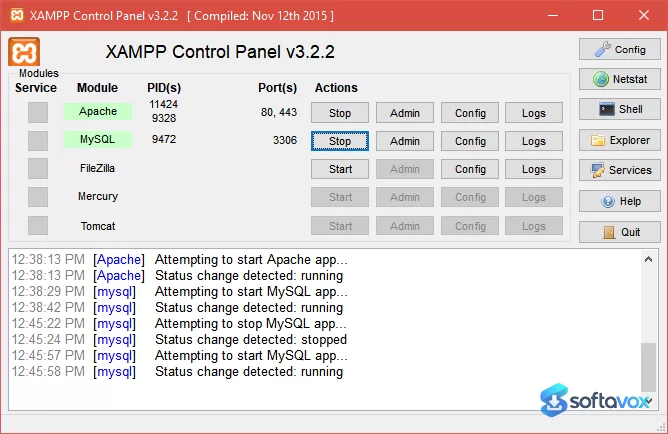
XAMPP’s core value is the speed with which it turns a clean machine into a working web development environment. You download a single installer or archive, run it, and the XAMPP Control Panel appears with buttons to start Apache and MySQL. There is no need to install or configure each component separately, and the bundle includes everything most PHP projects need out of the box: Apache HTTP Server, MariaDB (a MySQL-compatible database), PHP, Perl, phpMyAdmin, OpenSSL, and FileZilla FTP Server[reference:10]. The Control Panel is the primary interface, and it is functional rather than polished. You can start and stop services, open the configuration files, and check logs, but the interface has not received a major redesign in years. The software is genuinely cross-platform, with separate installers for Windows, Linux, and macOS, including Apple Silicon builds[reference:11]. This matters for students and teams who work across different operating systems, because the workflow and directory structure remain consistent. The Windows installer is digitally signed, and the project publishes SHA-256 checksums and GPG signatures for verification[reference:12]. The bundled tools extend the package beyond a bare server stack. phpMyAdmin provides a browser-based database interface, and Bitnami integration (historically) allowed one-click installations of WordPress, Joomla, and other applications[reference:13]. The limitations are equally clear. XAMPP is not designed for production use, and the project says so explicitly. Default security is minimal: MySQL root has no password, and Apache runs with permissive settings that are convenient for development but dangerous if exposed to a network[reference:14][reference:15]. The software can be unstable when MySQL configuration changes, and multiple users report crashes that require reinstallation[reference:16]. Performance and resource usage are also not priorities; XAMPP is heavier and slower to start than newer alternatives like Laragon[reference:17].
- One-installer Apache stack: Apache, MariaDB, PHP, Perl, phpMyAdmin, and OpenSSL are bundled and configured to work together, eliminating manual component installation and version-matching headaches[reference:18].
- XAMPP Control Panel: Start, stop, and restart Apache and MySQL with single clicks, and access configuration files and logs without leaving the interface.
- Cross-platform consistency: Separate installers for Windows, Linux, and macOS (including Apple Silicon) with the same directory structure and workflow across platforms[reference:19].
- phpMyAdmin integration: Manage databases through a browser-based interface, create tables, run queries, and export/import data without a separate database client[reference:20].
- Multiple PHP version branches: XAMPP releases parallel versions for PHP 8.5, 8.4, and 8.3, so you can choose the branch that matches your project’s compatibility requirements[reference:21][reference:22].
- Digitally signed installers and checksums: Windows installers are Authenticode-signed, macOS packages are notarized, and SHA-256 checksums are published for verification[reference:23].
- Bitnami application support (historical): The package has traditionally included or supported Bitnami modules for one-click installation of WordPress, Joomla, and other PHP applications[reference:24].
Pros, Cons & Community/User Feedback
User sentiment around XAMPP is defined by the gap between its ease of setup and its long-term reliability. On Capterra, the software holds a 4.7 average from 33 reviews, with users praising it as an “amazing backend tool” and a “great software bundle for PHP developers”[reference:25]. SourceForge reviews are more mixed. One user reports that they have “never had to reinstall a software package as much as this,” noting three crashes in a single month due to MySQL problems, and that “information about this problem online is mediocre and no solution works”[reference:26]. Another reviewer on the same platform concludes that “it works pretty well, but it could be much better”[reference:27]. Trustpilot is harsher, with a 2.6 out of 5 rating. One reviewer describes it as “complete trash” after it worked for three days and then began failing on MySQL, requiring uninstall and reinstall cycles, and concludes that users should change to “any other” tool[reference:28]. The complaints are not about the core concept, bundling Apache, PHP, and MariaDB is genuinely useful, but about stability and maintenance. MySQL configuration changes are a recurring source of crashes, and the software’s age shows in its interface and resource management. Security is the other major theme in user discussions. The project’s own documentation states that “XAMPP is not meant for production use but only for developers in a development environment,” and that users must “manually configure passwords, port settings, firewall rules, and access restrictions” before exposing it to a network[reference:29][reference:30]. A GitHub project titled “XAMPP is not secure” argues that infrequent updates have left security gaps, and notes that “if it is not very often updated, there is no security”[reference:31]. The project maintains that the software contains “absolutely no malware, adware, or spyware,” and that antivirus flags are false positives caused by the inclusion of server software that can modify system behaviour[reference:32]. The practical takeaway is that XAMPP is an excellent first tool for learning PHP and running a local WordPress site, but it is not a reliable long-term development environment for complex projects, and it is absolutely not a production server.
Pros
- Fastest way to get a working Apache, PHP, and MariaDB stack on any major OS
- Includes phpMyAdmin, OpenSSL, and FileZilla FTP Server in a single package
- Cross-platform with consistent directory structure and workflow on Windows, Linux, and macOS
- Free and open source with digitally signed installers and published checksums
- 4.7 average rating from 33 Capterra reviews, with strong praise for ease of setup
- Parallel PHP version branches (8.5, 8.4, 8.3) for compatibility with different projects
- Bitnami modules historically available for one-click WordPress and Joomla installs
Cons
- Not suitable for production use; default security is intentionally minimal and must be hardened manually[reference:33]
- MySQL configuration changes frequently cause crashes, requiring reinstallation[reference:34]
- Trustpilot rating of 2.6/5, with users describing instability and repeated reinstall cycles[reference:35]
- Control Panel interface is dated and has not received a major redesign
- Heavier and slower to start than newer alternatives like Laragon[reference:36]
- Limited per-project PHP version switching compared with modern stacks
- Infrequent updates have raised security concerns among some developers[reference:37]
Final Verdict & Safe Download Advice
XAMPP is the tool most PHP developers start with, and for good reason: it removes the friction of installing and configuring Apache, PHP, and a database separately, and it does so on every major operating system. If you are learning PHP, testing a WordPress theme, or need a disposable local server for a quick project, XAMPP will get you there faster than almost any alternative. The package includes the tools you need, phpMyAdmin, OpenSSL, Perl, and the Control Panel, while dated, is functional enough for starting and stopping services. The caveats are serious enough to change the decision for some users. XAMPP is not production software, its default security is intentionally weak, and it crashes when MySQL configuration changes. If you are building a long-term development environment, Laragon is a faster and more modern alternative with per-project PHP versions and cleaner startup behaviour. If you need per-project isolation and reproducible environments, Docker is the better answer. But for a first local server or a quick test environment, XAMPP remains the most accessible option, provided you configure basic security before exposing it to anything beyond localhost. Download the latest 8.5.12 release, set a MySQL root password immediately, and keep the installation for development only.
- Download only from apachefriends.org: The official XAMPP project site distributes the installers and archives directly. Third-party “XAMPP download” portals may repackage the installer with additional software, and the official site is the only source that guarantees you are getting the vendor-signed package with published checksums[reference:38].
- Verify the installer size and version: The Windows installer is approximately 160 MB, the Linux tar.gz is around 150 MB, and the macOS DMG is around 170 MB. The current release is 8.5.12, with parallel 8.4.27 and 8.3.36 branches. A dramatically smaller file or an older version number is a warning sign.
- Set a MySQL root password immediately after installation: XAMPP ships with a blank password for the MySQL root user by default. Open phpMyAdmin or the command line and set a strong password before doing anything else. This is the single most important security step for a local XAMPP installation[reference:39].
- Never expose XAMPP to the internet without hardening: The project explicitly states that XAMPP is for development only. If you need to access your local server from another device, restrict access by IP, enable firewall rules, and change the default Apache port away from 80. Do not use XAMPP as a production web server[reference:40].
- Keep the installation isolated to development: Use XAMPP for local testing only. If you need to share a project with others or deploy to a live environment, move to a properly hardened server stack or a managed hosting platform rather than exposing XAMPP directly.
Similar software






Key features
- Apache, MariaDB, PHP, and Perl in one package
- Runs on Windows, Mac, and Linux
- Works offline
- Bitnami one-click installers for WordPress, Joomla, Drupal, Moodle, MediaWiki
- Port 80 conflict fix via httpd.conf (change Listen 80 to Listen 8080)
- Default configuration is insecure, local development only
- CISA alert in January 2026 for multiple vulnerabilities
- Local privilege escalation vulnerability on Windows from default Apache config
- Experimental XAMPP for Browsers (PHP 8.3.12 on Alpine Linux)
- Does not include Node.js or MongoDB
- Uninstall leaves folders and registry entries behind
- No per-project PHP version switching
Frequently asked questions about XAMPP
Is XAMPP safe to use?
Is XAMPP free?
What operating systems does XAMPP run on?
What is XAMPP used for?
Why does Apache fail to start in XAMPP?
How do I uninstall XAMPP?
Versions
| Version | Release date | Platform | File size | |
|---|---|---|---|---|
| XAMPP 8.5.12 Latest version | Nov 19, 2023 | macOSWindowsLinux | 149.5 MB | Download |
Comments about XAMPP
No comments yet. Share your experience with this program!